Pro shop software, drilled to the 1/64″.

Drilld runs a bowling pro shop around what matters most: the fit. Bring your paper drill sheets in with AI, measure the way drillers measure, lay out any ball in the system you know, and drill it with the right bit and readout, with every revision kept.

Built inside a working pro shop. Free for 30 days on Pilot, no card needed. Rather talk it through? Contact Sales.

A looping demo of the Drilld drill sheet editor. It picks VISE P/O Power Lift inserts from what the shop carries, sizes 8 and 7, which set each hole's O.D., Then it taps the thumb to open Thumb, chooses Interchangeable and picks a VISE IT 1-1/4″ thumb with its collar bit, and adds the bowler's first thumb inner, League, in black, with an oval drilled into it: a 61/64″ starting bit, widened to 1-1/32″ at 25°, drawn as each value is picked. The sheet's thumb then shows that one inner fits. It sets outer-to-cut spans of 4-3/8″+ and 4-5/16″. Every change saves itself, and one is undone and redone. Then it approves revision 3, so a later change would start revision 4, and walks through the drill press view one hole at a time, thumb first: the pilot, the VISE IT collar bit, a 1/2″ hole 1″ to 1-1/8″ deeper than the collar hole, and installing the hardware.

Built by drillers, for drillers. Drilld runs our own pro shop first, then opens to yours.

  • Spans in 32nds
  • Bits in 64ths
  • Cuts to the thousandth
  • Pitch in inches
Flare · Beta

See how a layout rolls, before the bowler throws it.

Flare plays the bowler's delivery with the drilled layout down the lane, in slow motion, on a screen of its own: the track flare building on the cover, where the ball turns, and how it enters the pins. Then compare it with another shot. An estimate for comparing layouts, right beside the ball.

  • Compare two shots: change one thing (another of the bowler's balls, the pattern, the line, the surface or the delivery) and see both paths, with every number side by side
  • Over a thousand oil patterns: search by name, pick a series, or slide the length, volume and ratio to the shape you want
  • Their delivery: speed, revs, tilt and rotation from the bowler's profile, to try changes on without saving them
  • The lane from above: the path, the breakpoint and the entry angle into the pocket
  • Like a broadcast: speed, revs, tilt and rotation as it goes, with each moment marked from the arrows to the pins; full screen on a tablet with one tap
A screen recording of Flare in Drilld. The bowler's delivery (17 mph, 300 rpm, 15° tilt, 45° rotation) plays down a house shot with the drilled layout: the ball's track rings build while speed, revs, tilt and rotation read out like a broadcast, the moments are marked from the arrows to the pins, and the lane from above shows the path, the breakpoint on board 8 at 43 feet and the entry at 3.8° into the pocket. Then Compare adds a second shot, B. The oil pattern dialog opens, "sport" is typed into its search, and the 48-foot sport pattern is picked for B. Both shots roll again together: on the lane from above A is blue and B purple, and every number shows A over B. On the sport pattern the same layout breaks later, on board 11 at 46 feet, and enters at 4.5°.
A looping demo of importing a paper drill sheet on a phone. The phone's camera takes a photo of the sheet, it uploads, and AI reads it while the sheet stays pinned at the top of the screen. The bowler, the spans, the pitches and the thumb hole fill in below. The thumb hole was hard to read, 61/64 or 63/64, so it's flagged; tapping it zooms the photo to that spot, it's corrected to 63/64, and the correction is remembered. The inserts and the VISE IT thumb are matched to what the shop carries; it doesn't carry a VISE 7 for the ring finger, so its best fit, Turbo's 25/32″ (the same size by another name), is picked and noted. Import & open lands on the bowler's draft drill sheet, revision 1.
01 · Paper import

Bring your binders with you.

Years of fits shouldn't stay in a drawer. Take a photo of a paper drill sheet with your phone, or scan a whole binder, and Drilld reads each one with AI, so you check it instead of typing it in again.
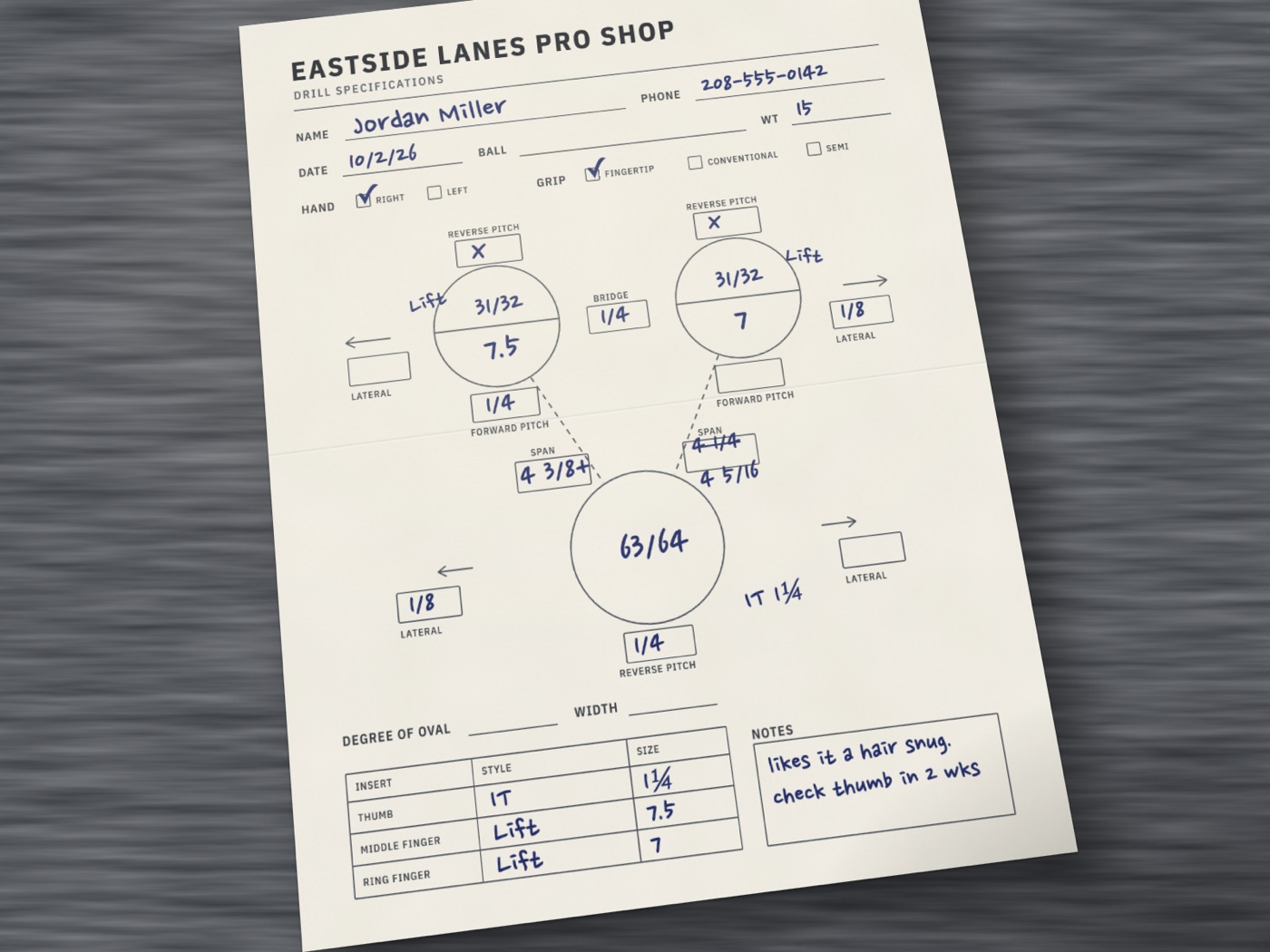
A handwritten paper drill sheet on a pro shop counter: the bowler's name, insert sizes in the finger holes, spans with one crossed out and corrected, pitch boxes, and an insert table.
A sheet like the ones Drilld reads. The bowler is made up. Psst: got one of yours handy? Try it.
  • Right from your phone: take the photo at the counter and check it there, with the sheet pinned on top
  • Reads the whole sheet: the bowler, the hand, the holes, the spans, the pitches, the oval, the inserts and the PAP
  • You check every value before anything is saved. Anything it's unsure of is flagged, and tapping it shows you the spot on the sheet.
  • Learns your shop: fix a misread once, or explain what your shop writes, and it reads your next sheets that way
  • Matched to your stock: inserts and thumb hardware come from what your shop carries, with its best fit (and how it differs) when there's no exact one
  • The paper stays on file, on the bowler's profile, and opens beside the drill sheet editor
03 · Ball layouts

Asked for 2LS? Mark it in Dual Angle.

Customers, coaches and ball reps don't all write layouts the same way. Enter a layout in the system it was given in, and Drilld gives you the same layout in the system you know, worked out exactly on the ball.

  • VLS, Dual Angle and 2LS: enter any one, read the others. 2LS is for two-handers.
  • Exact, not a lookup chart: calculated on a 27″ ball and checked against the published Dual Angle chart
  • The PAP comes from the bowler's profile, and each ball keeps its own pin to MB
  • See it in 3D before you drill: the layout marked the way you'd mark it, with the holes from the bowler's drill sheet
  • Every drilling's layout is kept with the ball
A looping demo of entering a ball layout. A two-handed bowler's 2LS layout of 5 x 4 x 3 is entered, and Drilld shows the same layout as 49.5° x 5 x 49.5° in Dual Angle and 5 x 4 x 3-5/16 in VLS, with a live view of the ball. The layout is added with the drill sheet revision drilled, then a 3D view of the ball turns with the pin, PSA and PAP marked, the 2LS arcs and then the Dual Angle angles drawn, and the two finger holes.
A looping demo of a drill sheet's revision history. Revision 3 is the current draft. Revision 2 was approved, and revision 1 was drilled. Opening revision 3 lists its changes from revision 2: outer-to-cut spans added, the thumb moved from a vinyl slug to VISE IT interchangeable hardware, and VISE P/O Power Lift inserts in both fingers. Opening revision 2 shows a bigger thumb hole, flexibility from 90° to 95°, and rev rate from 350 to 380 RPM.
05 · Revision history

Every fit has a history. Now you can read it.

When a bowler comes back, you shouldn't have to guess what changed last time. Drilld keeps every revision of a drill sheet, so you can see who changed what, and when.

  • Nothing to save: every change saves itself, with undo and redo until the revision is approved
  • Drafts stay editable until they're approved or drilled. After that they lock, and any change starts a new revision.
  • Who and when: who created each revision, who last saved it and who approved it
  • What changed: every field that differs from the revision it started from, old value to new
  • Discard a draft to go back to where it started. The draft stays in the history.
Thumb inners

Every inner they own, and which balls it fits.

Bowlers with interchangeable thumbs move inners from ball to ball. Drilld keeps each one with the bowler: the hardware and thumb pitch it was made for, and the hole drilled into it. You can see which inners fit which balls, and how to drill the next one.

  • VISE IT, Turbo Switch Grip and NX, and JoPo Twist: the sleeve is drilled into the ball, and the thumb hole goes into each inner
  • Fits, or why not: each inner is checked against the bowler's sheets and balls for hardware, hand and thumb pitch
  • Round or oval: the starting bit, width and angle, drawn to scale with each cut's readout
  • Drilled in the ball or in a jig, with any pitch in the inner, step by step at the press
  • Name it, color it, and retire it when it's worn out or lost
Thumb
In the ball
VISE IT 1-1/4″Collar bit · pilot 2-3/4″1-5/16
Fwd / rev pitch1/4 reverse
Lateral pitch1/8 left

The outer is drilled at this pitch. The thumb hole and its oval are drilled into each inner.

Jordan's inners+ Add inner
League BlackVISE IT · 61/64 – 1-1/32 · 25° ovalFits
Tape OrangeVISE IT · 63/64 round · jigFits
Old spare RedVISE IT · 31/32 roundOther thumb pitch
League · the hole, in the inner
#VerticalHorizontal
1−.233−.160
2−.242−.143
center−.250−.125
3−.258−.107
4−.267−.090
61/64″ starting bit to 1-1/32″ at 25°: four cuts, never more than 1/32″ each.
Jordan's thumb is a VISE IT interchangeable thumb, drilled at 1/4″ reverse and 1/8″ left. Jordan has three inners: League (black), an oval from a 61/64″ starting bit to 1-1/32″ at 25°, which fits; Tape (orange), a 63/64″ round hole drilled in a jig, which fits; and Old spare (red), made for another thumb pitch. League's oval is drawn to scale with the readout for each of its four cuts.
Precision

Measured the way drillers measure.

Shops write 16ths and add a "+" for the extra 1/32. Drilld stores exactly that, never rounds it, and keeps every span type separate. A full span is never quietly turned into a fit span.

  • Five span types (full, cut-to-cut, outer-to-cut, center-to-center and fit), each recorded as entered
  • The bits you own: 1/2″ to 1-1/8″ in 64ths, plus collar bits for interchangeable thumbs
  • Oval cuts calculated from the bits you drilled, shown to the thousandth
  • Pro Fit for fits that break the norms on purpose, so the warnings get out of your way
EntryStoredUnit
4-3/8″+14132nds
31/64″3164ths
1-3/16″7664ths · IT collar
.032″32thousandths · one cut
3/16″ R−632nds · reverse
Speed

Fast, because the counter doesn't wait.

Most pro shop software makes you wait: a spinner between every screen while a bowler stands at the counter. That's part of why we built Drilld. Speed isn't something we hope for. We build for it, and we watch it.

  • Nothing to save: every change saves itself in the background, so you're on to the next value
  • Screens hold their shape while they load, so nothing jumps around when the data arrives
  • Always current: screens refresh themselves, so you never reload to see what a coworker just changed
  • Every request is timed, and we look at the slowest first. When something slows down, we see it and fix it.
And the rest of the shop

Everything else a pro shop runs on.

Generic POS software treats a drilling as a line item. Drilld treats it as the center of the shop, and builds the rest around it.

The drill press view

A big, dark tablet screen at the press: one hole at a time, each step's bit and depth, and where the readout should be, signed the way your press counts.

Photos and scans on file

Paper sheets, photos and scans live on the bowler's profile, turned upright and zoomable, and open beside the drill sheet while you work.

The grips you actually stock

A built-in catalog of insert and thumb-hardware lines from VISE, Turbo and JoPo, with every size and its fixed O.D. Each location picks what it carries, so the insert picker only offers what's on the wall.

Bowler profiles with their delivery

Tilt, rotation, PAP, speed and rev rate on every customer. Each drill sheet revision keeps a snapshot of the delivery as of that fitting, so you can see how a bowler changed.

Know a ball before you drill it

Every ball is tracked by its serial number. When a used ball comes in, you'll see how many times it's been drilled and plugged and the month it was last worked on, even if another shop did the work. Who owned it stays private to the shop that recorded it.

Your data stays yours

Every shop's data is isolated at the database level. Sign-in is invite-only with optional two-factor authentication, and staff permissions come from their roles.

Every ball, already in Drilld

Current releases from the manufacturers come in with their specs and images, kept in sync. Add a bowler's ball by its serial number, and type in older balls the catalog doesn't have.

Bevel, depth and step drilling

Your shop's standard hole depths, bevels by knife, sander or both, and step drilling, kept on the drill sheet and carried to the press.

Machines that stay true

Scheduled maintenance for each drill press, with how-tos, checklists and a log. A jam or a snapped bit makes the alignment check due today.

Full screen at the press

Add Drilld to a tablet's home screen and it opens like an app, full screen. The press view keeps the screen awake while you drill.

Find any bowler fast

Search by name, phone or email as you type, with typos forgiven. Each shop sees its own bowlers first, and chooses which of your other shops' customers it shows day to day.

Settings that fit each shop

Set tax, warranty, readout directions, standard depths and bevel once for the company. A location changes only what it does differently, and a press can count its readout its own way.

One company, every shop

Run one pro shop or several, from one account.

Bowlers and their drill sheets belong to your company, so a customer can walk into any of your shops. Work orders and equipment stay with the location that owns them.

  • Roles per location: Manager, Senior Tech, Technician and Apprentice, with owners and admins covering every shop
  • Company settings, local overrides: set defaults once and let a location change what it needs
  • Hours that stay current: weekly and holiday hours for each location, and whether it's open now in its own time zone
  • Devices set to their shop: the press tablet knows which shop and which press it's at
  • Plans that grow with you, from a single shop to as many as you run
A looping demo of a shared device. The front counter tablet shows a lock screen for Eastside Lanes Pro Shop. Sam taps a four-digit PIN and the app opens with Sam's name in the menu. Sam approves revision 3 of Jordan's drill sheet, which now reads approved by Sam R. Sam taps the lock. Casey types a wrong PIN, sees "That PIN didn't match anyone", tries again and is in, and Sam's approval still reads Sam's. Left alone, the tablet locks itself again.
Shared devices

One tablet at the counter. Everyone's name on their own work.

The tablet at the press and the counter computer stay signed in all day. Whoever's using one taps their PIN, and Drilld is theirs until they lock it or walk away.

  • A PIN, not a password: 4 to 6 digits, each person's own, set from their own phone or computer
  • Their name on what they do: edits and approvals are recorded under whoever's at the device
  • Their role decides what they can change at that shop, wherever they tap in
  • It locks itself after a few minutes unused, and each company sets how long
  • Locked to its shop: only a manager there, an owner or an admin can move it. A run of wrong PINs pauses the pad for a minute.
Switching

Using something else today? We'll get you moved over.

Paper sheets, a spreadsheet or other drill sheet software: tell us what you use and we'll bring your bowlers and drill sheets with you, so you don't start over or type every bowler in again.

Ask about switching
Pricing

Start free for 30 days. Pick a plan when you're ready.

Every plan includes drill sheets with every revision kept, the drill press view, paper import with AI, and layouts in 3D.

Pilot

Try Drilld free for 30 days.

Free for 30 days, no card needed

Start free
  • 1 location
  • 1 person
  • 50 customers
  • 20 bowling balls
  • 1 drill press
  • 10 paper imports to try
  • 1 GB of files
  • Not included: Shared devices and PINs
  • Not included: Maintenance schedules

Starter

One shop getting off paper.

$29 a month

Start with Starter
  • 1 location
  • 1 person
  • 250 customers
  • 100 bowling balls
  • 1 drill press
  • 25 paper imports a month
  • 5 GB of files
  • Not included: Shared devices and PINs
  • Not included: Maintenance schedules

Basic

One shop and its team.

$49 a month

Start with Basic
  • 1 location
  • 3 people
  • Unlimited customers
  • Unlimited bowling balls
  • 1 drill press
  • 50 paper imports a month
  • 10 GB of files
  • Shared devices and PINs
  • Not included: Maintenance schedules

Pro

Growing shops with more presses.

$99 a month

Start with Pro
  • Up to 4 locations
  • 10 people
  • Unlimited customers
  • Unlimited bowling balls
  • Every press and equipment
  • 100 paper imports a month
  • 50 GB of files
  • Shared devices and PINs
  • Maintenance schedules

Don't see a plan that works for you?

Contact sales about Enterprise pricing: more locations and people, higher allowances, billing by invoice, and help moving your shops over.

Contact Sales

Paid plans start on Pilot: confirm your email, then subscribe by card through Stripe. Change plans or cancel any time. Prices in US dollars.

Start your shop on Drilld.

Start free for 30 days on Pilot and bring in your own sheets, or pick a plan. Want a walkthrough first? Talk to us about your shop.

No card needed for Pilot's 30 days. Change plans or cancel any time.